SoLIM Solutions provides interface for you to edit different kinds of rules conveniently. Many kinds of rules can be edited in both numerical (text) and graphical modes.
| • | Edit a Range Rule |
| • | Edit a Freehand Rule |
| • | Edit a Word Rule |
| • | Edit a Enumerated Rule |
| • | Edit a Point Rule |
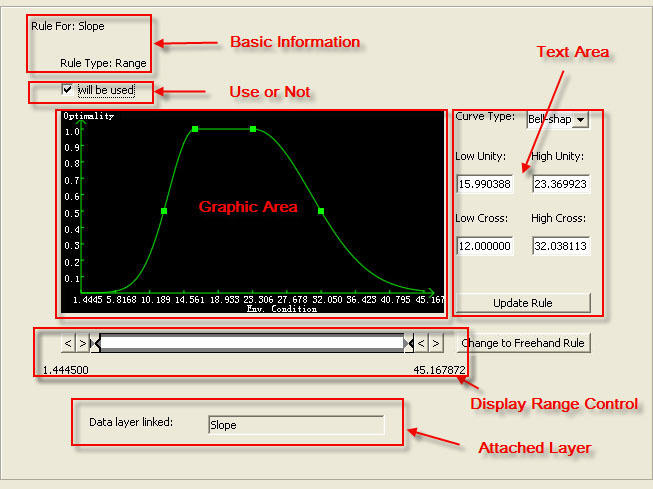
When you create a new rule or click on a rule in the control panel, you will see the rule editing view. Each kind of rules has a different editing view. However, the basic components of the views are the same. The following picture shows the editing view for Range Rule.
The rule editing view contains the
an area to display basic information of the rule
a check box to specify whether the rule will be used in the inference
a graphic area to show the corresponding graph (curve) of the rule
a text area to input parameters or display more detailed information of the rule
a tool to control the display range
an area to display and manipulate the attached layer of rule